Database, Table and Column naming conventions
A naming conversion is a set of rules you should follow to increase your data models’ readability. In this post, we will talk about the best practice I have found and followed along on my career as a developer (PHP, Node.JS, MySQL, PostgreSQL) and the reasons for each one of them. In the end, it’s not important which one you follow, but you should follow a naming convention.
Table Name
You should use singular nouns for database table names.
If you have a table to store the users data, this table should be called user Or users?
Let’s analyze both cases to understand the difference between each approach.
Plural
- Clear that the table is storing more than one user.
- It reads well in the
FROMclause
SELECT id, name from users;Singular
- We are not naming a table, we are naming a relation.
- It reads well everywhere else in the SQL query:
SELECT id, name
FROM user
JOIN country ON ( user.country_id = country.id )
WHERE country.name = "Japan"- It would make less sense if the
ONClause readusers.country_id - If you are using an ORM, the class you will store your data is already in singular
User
Column Name
You should use snake_case for your column names.
| Examples |
|---|
| country_id |
| first_name |
| last_name |
| display_name |
| is_active |
| created_at |
| github_access_token |
Why snake_case
- SQL standards are case insensitive — snake_case works naturally with how databases handle identifiers.
- Readability is better — especially for long names like
github_access_token. - Universal convention — most databases, ORMs, and tools expect snake_case. Following the standard reduces friction.
- Data mapping between snake_case columns and camelCase application code is a solved problem. ORMs handle this automatically.
Fields
Date Fields
- Include the timezone, specially if you are working on a global project.
- As a good practice all tables should have a
created_atandupdated_atcolumn, it will be very useful for debugging. - Field should finish with
_at- created_at
- updated_at
- deleted_at
- last_updated_at
Primary Key
Column name must be always named id.
It’s short, simple and you don’t have to remember the names of the fields to join tables.
Foreign Keys
They should be a combination of the name of the foreign table and the + _id, examples:
- user_id
- post_id
Status Fields
- use booleans for single status.
- is_active
- is_published
- Use enums if you need few columns that can be true or false at the same time.
- post.status (draft, inactive, published)
- user.status (inactive, active, banned)
- product.status (draft, in_review, approved, disapproved)
Enum Values
Enum values should use snake_case and be descriptive. The value should clearly communicate its meaning without needing additional context.
status ENUM('active', 'inactive') DEFAULT 'inactive',
approval ENUM('pending_approval', 'approved', 'disapproved') DEFAULT 'pending_approval',
stock ENUM('in_stock', 'out_of_stock', 'pre_order') DEFAULT 'in_stock',
Junction Tables
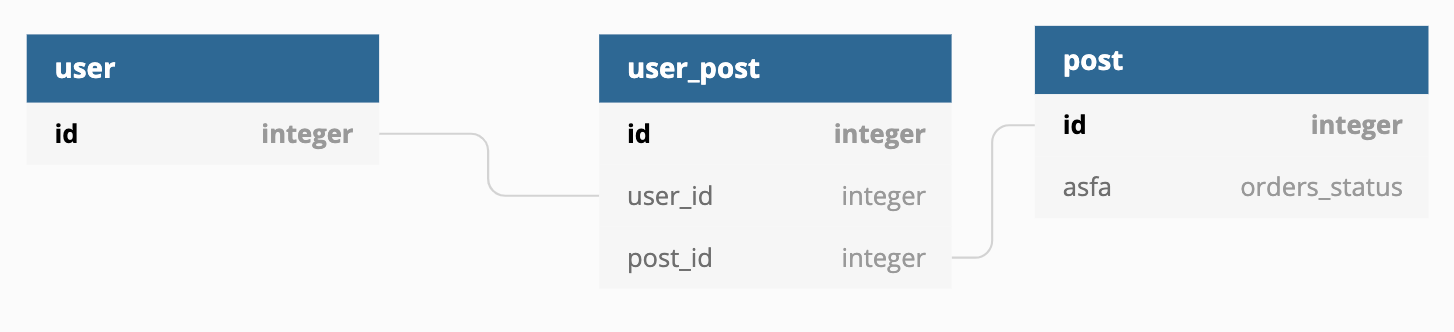
Junction tables (also called join tables or bridge tables) connect two entities in a many-to-many relationship. The table name should be a compound of both table names in a readable order.
Examples:
user_hotel_wishlistbooking_touruser_post
Avoid auto-increment IDs for junction tables. Use a compound primary key instead. The combination of both foreign keys is already unique and serves as a natural primary key.
CREATE TABLE user_post (
  user_id INT NOT NULL,
  post_id INT NOT NULL,
  PRIMARY KEY (user_id, post_id),
  FOREIGN KEY (user_id) REFERENCES user(id),
  FOREIGN KEY (post_id) REFERENCES post(id)
);
A compound primary key prevents duplicate entries at the database level and removes the need for an unnecessary id column.